Knowledge bases grow by adding. People write a document for a new project, copy an old one to adapt it for their team, and rarely delete anything. After a few years and a reorganization or two, there are several versions of the same process and nobody is sure which one the team still follows.
For a long time that mostly cost people time. In our enterprise search survey, 34% of workers spent 30 to 60 minutes a day waiting for answers to their questions.
Now AI assistants and agents read the knowledge base too, and they answer from whichever version they find first, with the same confidence whether it's current or two reorganizations old.
At some point, every company has to stop adding and take stock of what it already has.
A knowledge audit gives you a clear picture of what your company has written down and what's missing, out of date or duplicated. It ends with one decision for every document, so the knowledge base you keep is one people and AI can trust.
Key takeaways
- A knowledge audit is a baseline of what your knowledge base holds and what's missing, out of date or duplicated.
- Decide what belongs in the knowledge base before you count anything.
- Measure where you stand with a few counts and a short test of your AI's answers.
- Let AI flag problems on a copy of your knowledge base, and keep the final call with people.
- Finish with a decision for every document, then hand each one to an owner with a review date.
What is a knowledge audit?
A knowledge audit is a structured review of what a company knows and where that knowledge is written down. It checks what exists across every tool and what's missing, duplicated or out of date, and ends with a decision for each document.
Companies run it once as a baseline, then again after a big change, such as a reorganization, a merger, a move to a new tool or a new AI rollout.
Each document ends up kept, updated, merged with its duplicate, linked to the system it belongs in, or archived. Keeping the knowledge base in shape afterwards takes regular knowledge base maintenance.
The goal is a single source of truth that stays current, where knowledge survives people leaving, teams changing and every new version of the company.
Why a knowledge audit matters more once AI reads your knowledge base
AI makes wrong knowledge more expensive. Every outdated or duplicated document costs tokens when the AI reads it, time when a person has to check or redo the answer, and quality when a wrong answer goes into a customer email, a report or an agent's next action.
AI runs into two problems with company knowledge:
- Too many sources. Knowledge sits across the wiki, drives, chat, the help desk and the CRM, so AI has to be connected to all of them. Connectors and enterprise search tools now reach most of these places, so this problem is getting easier.
- Accuracy. Once the AI can reach everything, it still can't tell which document is true. Outdated, duplicated and contradicting documents all look equally valid to it, and better search doesn't change that.
A knowledge audit works on the second problem.
In a recent stress test of retrieval systems, the same model answered 98.6% of questions correctly with a clean knowledge base and 25.4% when facts in the documents had been altered, with nothing else about the setup changed.
Cleaning the documents is also cheaper than working around them.
A smarter, more expensive AI setup can read more sources and reason longer, but it still answers from the same wrong documents, and each answer costs more.
How to decide what belongs in your knowledge base
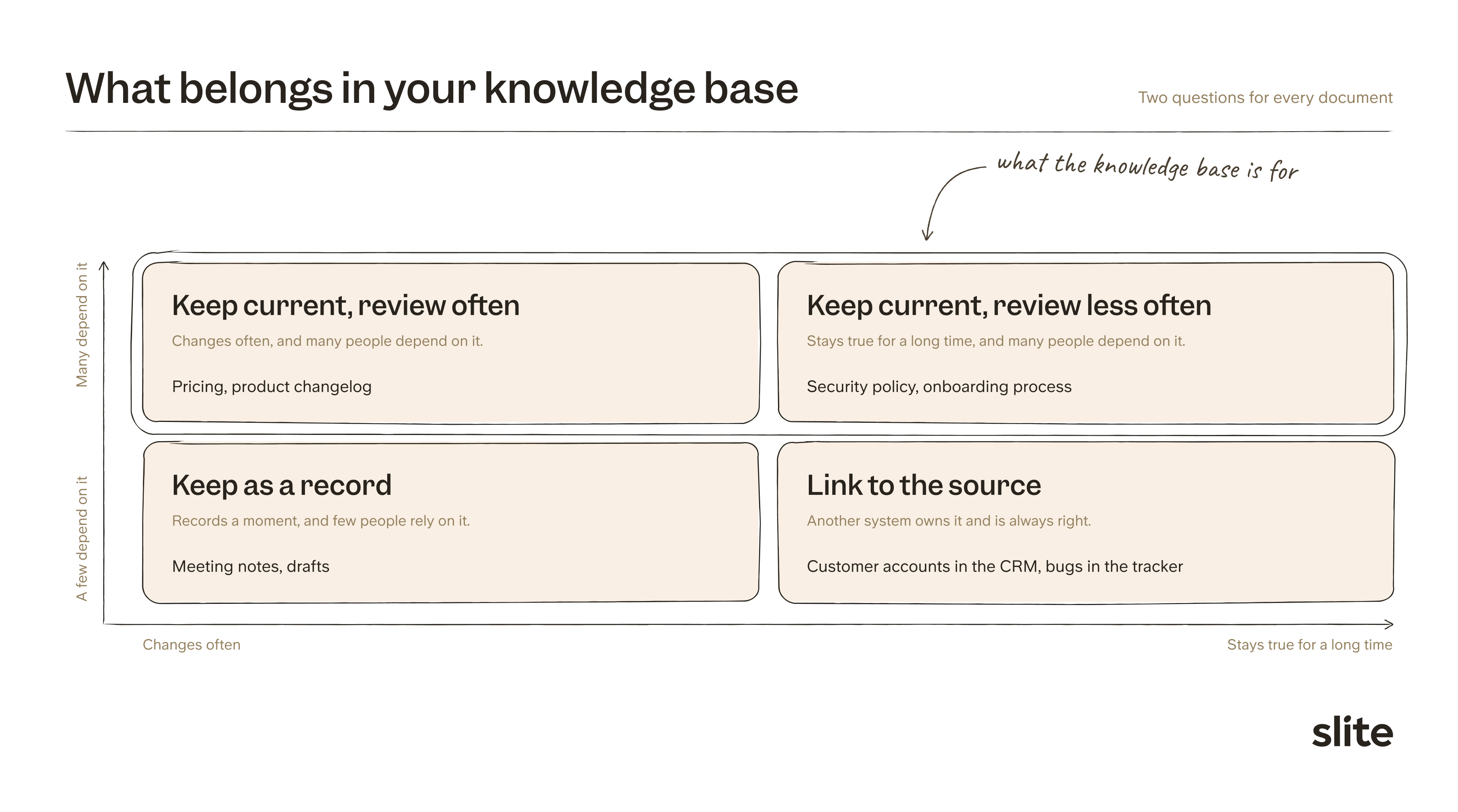
Before you count anything, decide what the knowledge base is for.
A knowledge base should hold durable knowledge: the policies, processes and product information that several teams rely on and that stay true for months or years. People and AI come back to these documents for answers, so they're the ones that have to stay current.
Everything else gets a different treatment. Meeting notes and drafts can stay findable as records but shouldn't be treated as the truth, and knowledge that lives better in another system gets linked.
Start with an inventory of every place knowledge lives: the wiki, shared drives, chat, the help desk, the ticketing tool. Then sort what you find into three groups, using two questions for each document: how long it stays true, and how many people depend on it.
Knowledge that must stay current
These are the documents the knowledge base is for. Each one gets an owner and a review date. Typical examples:
- Policies, such as time off, expenses, security and data handling
- Processes and playbooks, such as onboarding, customer handoffs and incident response
- Product information, such as how features work, pricing and the changelog
- Company basics, such as who owns which area, team structure and the tools each team uses
Some of these change rarely, like a security policy. Others change every week, like pricing, so they get shorter review dates.
Knowledge that belongs in another tool
Technical specs belong next to the code, support answers in the help desk, account history in the CRM and live prices in the billing system.
Copying them out of their system of record creates a second version that falls behind the first. Link to the source instead.
The same logic applies to migrations. Moving everything into one tool carries every duplicate and outdated document with it, so decide what stays before anything moves.
Records of a moment in time
Meeting notes, drafts, old proposals and project logs record what someone thought at a given moment. They're useful history, and people should still be able to find them.
They become a problem when they're stored alongside policy with nothing to mark them as never final.
Keep them in clearly marked spaces, out of the source of truth and out of AI search. When a meeting reaches a decision, write the decision into its own document with an owner, the same habit teams use to build a knowledge base for AI agents.
How to measure where your knowledge base stands
Before you change anything, measure how much of your knowledge base you can trust and where the problems sit. Two things give you that baseline: a few counts across your documents, and a short test of the answers your AI gives.
Start with the counts:
| Count | What it tells you |
|---|---|
| Share of documents verified | How much of the knowledge base someone has checked |
| Share of documents with an owner | Whether someone is responsible for keeping it true |
| Share of duplicates | How often the same knowledge exists twice |
| Share not viewed in six months | How much nobody reads |
| Share not updated in six months | How much nobody maintains |
Then test the answers. Take 20 to 50 real questions from chat and support, ask your AI assistant each one, and mark the answer right or wrong.
Trace each wrong answer back to the document it came from. Those documents are where the audit starts. The AI context audit template walks through this test for one AI use case.
Run the same questions again after the audit. The share answered correctly from verified documents, the verified answer rate, is the number to track from then on.
How to run the audit with AI and decide on every document
The safest way to audit with AI is to give it a copy of your knowledge base and let it report, never edit. Use an export, a test workspace or read-only access. The AI flags documents, and a person decides what happens to each one in the live knowledge base.
AI assistants such as Claude and ChatGPT can connect to a knowledge base through an MCP server, which lets them read documents directly.
Give the assistant your scope rules from the first step, then ask it to flag:
- Documents that don't belong in the knowledge base under your scope rules
- Duplicates, including copies someone made to adapt a document that no longer match the original
- Documents that contradict a newer document on the same fact
- Documents nobody has viewed or edited in six months
- Meeting notes and drafts that are being treated as the final word
Keep the final call with people, even when the AI is confident.
One team that gave an assistant write access to clean up found it archived far more than they intended, because it couldn't tell an old document nobody reads from an old document that still matters.
Running the audit through AI also has a cost, so plan for it before you start. A full pass with a frontier model can use up a plan's limits or run up a large API bill, while a small, cheaper model handles the sorting well.
Collect the reviewed flags in one report, with a decision for every document:
| Document | Owner | What flagged it | Decision | Review date |
|---|---|---|---|---|
| Sales to onboarding handoff v3 | Head of customer success | Duplicate of v4 | Merge into v4 | 3 months |
| Time-off policy 2024 | People team lead | Not updated in 14 months | Update | 6 months |
| Q2 planning notes | Former product manager | Record treated as current | Archive | None |
| API rate limits | Engineering lead | Copy of the developer documentation | Link to source | None |
Each decision belongs to someone who knows the work.
APQC's guidance on removing outdated or duplicate knowledge puts content ownership with the business, because only people with that knowledge can decide whether a document should be updated, archived or merged.
Retiring content is usually the hardest call, because someone always worries the document might be needed one day.
Archiving instead of deleting solves most of that worry. The KCS methodology treats an archived article as removed from search but not destroyed, so anything archived by mistake can be restored.
What happens after a knowledge audit
A one-time cleanup doesn't last unless each kept document has someone looking after it.
Upkeep works best as small, regular work done by the people who use the knowledge, instead of a big cleanup that waits for the next audit.
The KCS methodology compares it to a garden that needs constant weeding, and asks anyone who finds a problem in a document to flag it or fix it on the spot.
The audit turns into a loop of four habits:
- Decide. Keep the knowledge base for durable knowledge, and revisit what belongs about once a year.
- Own. Many people write, and one accountable lead per area keeps documents true, with experts verifying their own documents.
- Track. Watch the share of verified documents and the verified answer rate, plus the questions AI couldn't answer.
- Act. Archive, merge and move records out, and verify, reassign or update what stays.
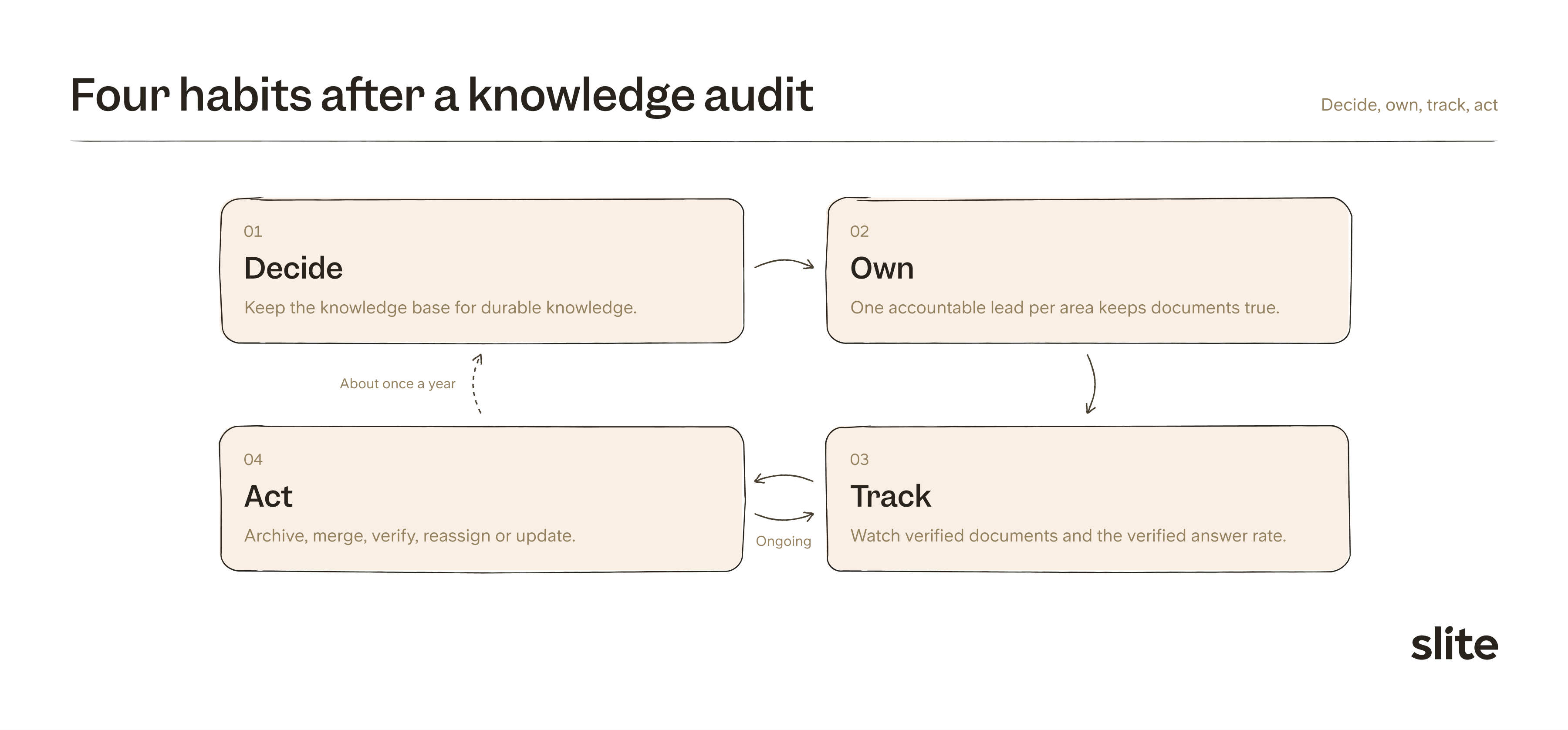
Over time, these habits become a knowledge management process where documents move from capture to retirement on purpose.
How to run a knowledge audit in Slite
We built Slite so a company can run the audit and the habits after it in one place. If your knowledge base lives in another tool, you can import it from Notion, Confluence or files first, and every step below works the same way.
Measure where you stand with knowledge analytics
Knowledge analytics shows the baseline from the measure step without counting by hand:
- The share of your documents that are verified
- How many AI answers rely on verified documents
- The unverified documents AI reads and cites most, so you know which ones to fix first
The Knowledge Management panel adds the per-document view: verification status, owner, views and last activity, with filters for inactive and empty documents and bulk actions to verify, reassign or archive.
Clean up with Slite Agent
Slite Agent runs maintenance programs on a schedule you set. A program checks documents, for example the ones AI relies on, against their sources and proposes each fix as a change request.
The owner reviews the change and approves it before anything is applied, so the agent does the checking and people keep the final call.
To find duplicates, Doc insights lists similar documents, and you can ask Slite Agent to find copies and suggest which ones to merge. If you prefer your own assistant, the Slite MCP server lets Claude or ChatGPT read your workspace, and every edit shows up in the document history.
Set up channels and owners
Channels have admin, writer and reader roles, so each department can have one accountable lead while everyone keeps access.
For trusted documents like policies, protected editing stops accidental changes. Writers can still edit after choosing to.
Keep documents verified
Doc verification lets owners mark a document as verified for a set period, and Slite notifies them when it expires. Give fast-moving documents like pricing a short period and stable policies a longer one.
Documents marked as outdated are kept out of Slite Agent's answers and ranked lower in search, so the assistant answers from what the team has checked.
If you'd like to see how this works on your own knowledge base, book a demo and we'll walk through an audit with you.
Final thoughts
The value of a knowledge audit is the decision it leaves on every document and the owner who keeps that decision true. An audit often leaves the knowledge base smaller, and that helps. Fewer documents, each owned and verified, give people and AI better answers than a large archive nobody trusts.
FAQ
How often should you do a knowledge audit?
Run a full knowledge audit once to set a baseline, then again after a big change such as a migration, a merger, a reorganization or a new AI rollout. Between audits, owners, review dates and regular checks keep the knowledge base current.
Who should run a knowledge audit?
A small group works best. One person owns the audit, someone from support or another frontline team brings the questions people actually ask, and the lead of each area decides what happens to the documents in it.